 ROMIND
MESSENGERS
ROMIND MESSENGERS is an international messenger with built-in ROMIND AI. On a WorldCall you speak your language and hear the other person in yours. Keep friends and clients in separate spaces, ask ROMIND to turn an agreement into a task, and bring children into the family conversation through their own parent-managed accounts. It all takes place in one app.
Find your space
“ROMIND, what time did we agree on in this chat?”
ROMIND “Tomorrow at 10:30. Anna confirmed.”
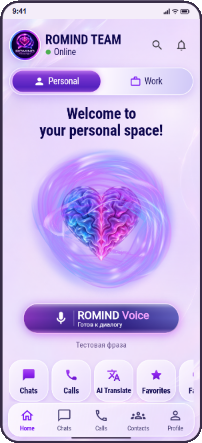
Your account travels with you.
A permanent ROMIND ID and separate Personal and Work identities.
Inside Personal Space →Satellite connectivity
When the road takes you beyond the mobile network, a message home still matters. ROMIND MESSENGERS is developing a way to stay in touch by satellite from within the messenger.

Before you leave
Activate satellite connectivity in ROMIND MESSENGERS while you still have Wi-Fi or mobile internet. That first connection lets you prepare before the trip.
Beyond mobile coverage
When mobile service drops out, open the messenger on your phone. Where satellite service is supported, the satellite connection gives your message another way to reach the person waiting for it.
A friend sends a voice note. A client asks for a new date. Your family is choosing a weekend to get together. All three conversations belong here. In Personal you can translate a message or listen to its translation. In Work you can ask ROMIND to summarise a discussion, then agree on the next task with your team. In Family World you can put the gathering on the shared calendar.
Inside the messenger
Conversations
Personal SpaceMessaging, Calls & StoriesStories & communitiesGuest BridgeLanguages & AI
AI Translation & WorldCallWorldCallROMIND Voice & AIWork
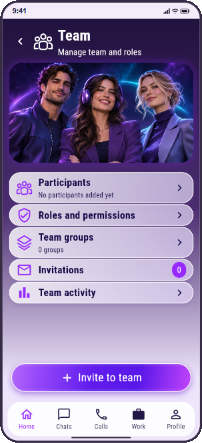
Work SpaceClients & CRMProjects & tasksTeam & rolesFamily
Family CircleMemory CapsulesTrust & access
Privacy & SecuritySecure ConnectPlans & PricingProduct StatusFrequently Asked QuestionsMESSENGERS SupportInside the mobile app
Select a screen for a closer look.
App screens
Identity & DualSpace
Change your SIM. Keep your identity.
Your ROMIND ID stays with you when you change SIM cards. Sign in with your email and decide whether to link a phone number.
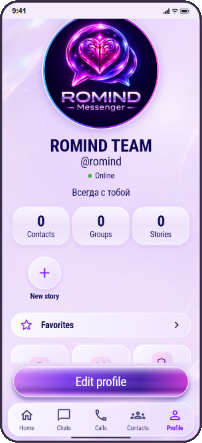
DualSpace keeps the contacts, chats, calls, Stories and notifications of each profile separate. Your colleagues see your Work profile and your friends see Personal.
Personal Space →Your handle, Stories and favourite contacts in one place.
View original screenEveryday communication
A private reply, a group discussion, a public update.
Send a private message, start a group discussion or publish an update in a channel. Add a voice note when tone matters.
Share a Story with the people you choose. To talk it over, open a chat or start a voice or video call in the same space.
Messaging, calls and Stories →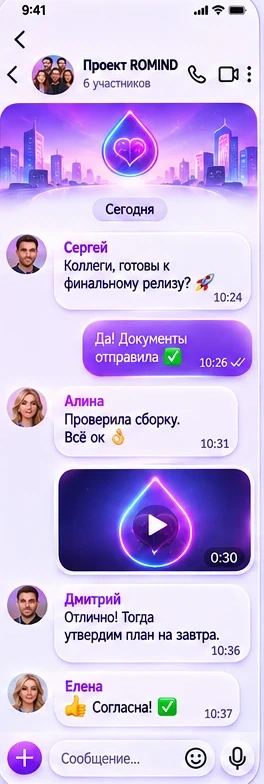
Send a private message, start a group discussion or publish an update in a channel. Add a voice note when tone matters.
View original screenInternational communication
Two languages. One conversation.
Choose a message to read in your language. For a voice note, read the transcript or listen to the translated speech.
In WorldCall, each person chooses a language. With both participants’ consent, the call translates speech in both directions.
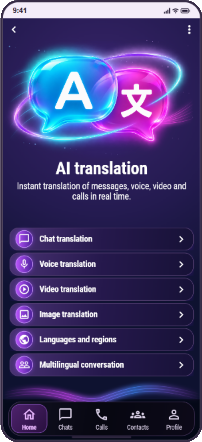
AI Translation & WorldCall →The translation menu brings together chat, voice, video and image translation, language regions and multilingual conversations.
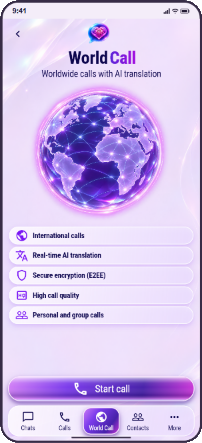
View original screenThe WorldCall screen brings international calling and real-time AI translation into one call flow, with entries for personal and group calls.
View original screenROMIND AI & ROMIND Voice
What did we agree on?
Before you call a client back, ask ROMIND to pull the agreed price, the delivery date and the question still open from the messages you choose.
After a call, say “I promised to send the estimate by Friday.” ROMIND Voice can prepare a task with that deadline for you to confirm, while the details are still fresh.
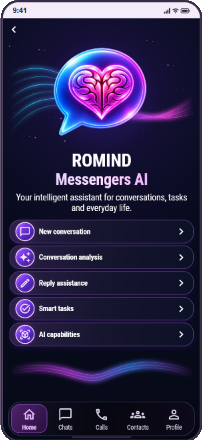
ROMIND Voice →The assistant screen groups new conversations, conversation analysis, reply assistance and smart tasks.
View original screenWork Space
From the first client message to the next task.
Open a client record to see past conversations, notes and deals together. When a client calls back, you can pick up at the last agreement.
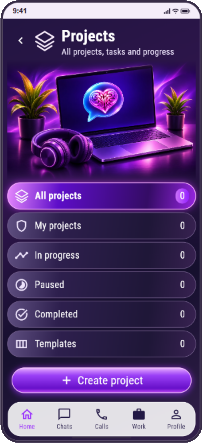
Turn a decision into a task. Set the deadline, assign a teammate and keep the brief and files with the project.
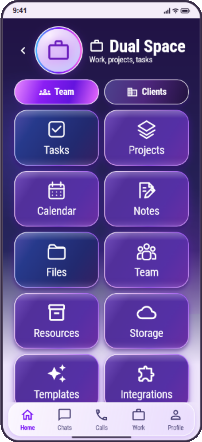
Work Space & CRM →The workspace brings together clients, tasks, projects and files.
View original screenFamily Circle
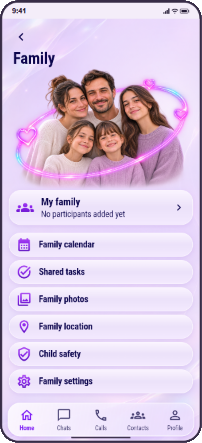
A family call with a guardian in the loop.
Family Circle connects a family across two apps. A child calls Grandma from ROMIND KIDS and she answers in MESSENGERS. Parents choose who joins the circle, so a child stays in their own age-appropriate space even when the whole family is together.
A child can talk to other children within the circle set by their guardian. An adult who wants to get in touch must send a request. The messenger checks the guardian’s approval before a message reaches the child or a call rings. Family Circle can also link a separate ROMIND KIDS account.
Family Circle & child safety →The adult Family space groups the family calendar, shared tasks, photos, location, child safety and settings.
View original screenSharing & invitations · Product design
Who is this moment for?

Bring a guest into one call
Send a guest a time-limited link to one call. They can join from a browser, even without a messenger account.
Choose a circle for a Story
Choose a Trust Circle before posting a Story. A family photo and a work update can each reach their own audience.
Keep a memory for an anniversary
Collect the photos and videos of one occasion in a Memory Capsule. A birthday, a trip or a family reunion stays together.
Find a conversation and return to it later
Find an earlier message with search, then schedule a reply for a time that suits the recipient.
Account & safety
Know who can reach you.
Review active devices, close an unfamiliar session and turn on two-factor authentication. Block a contact or report a message from the app.
Privacy & security →Secure Connect
When the network changes.
When your phone switches from Wi-Fi to mobile data, Secure Connect handles reconnection for messages and calls. Recovery depends on the new connection.
Secure Connect →Plans & access
Choose the capabilities you use.
Personal chats, basic groups, ordinary voice and video calls, DualSpace and account safety are free.
AI Translate is separate from PRO. Drops cover additional WorldCall translation minutes.
Plans & billing details →